S3 Sync
Use an S3-compatible bucket as an encrypted sync hub. Devices can connect from different networks. Read the Sync overview for scheduling, categories, pending decisions, chat branches and Undo.
Prerequisites
- Upgrade the Luker installations that will share data.
- Create a bucket with your storage provider before adding the backend. Supply its compatible endpoint, region and path-style setting.
- Allow the credentials to read and write objects in the selected namespace and delete temporary setup objects. Conditional object writes must be supported.
- Use the same bucket and normalized prefix on joining devices. Reserve a separate namespace for unrelated data sets.
- Prefer HTTPS for both access to your Luker server and its connection to storage. A private endpoint on a multi-user installation also requires the administrator's private-address policy.
Add storage
Open User Settings → Account → Backup & Restore → Sync → Open Sync, then Add S3 backend.
| Field | What to enter |
|---|---|
| Backend label | A name for this connection, such as Shared archive. |
| Categories to sync: | The data to share; see categories and sensitive data. |
| S3 endpoint | The provider's HTTP or HTTPS endpoint. Use HTTPS when available; keep credentials out of the URL. |
| Region | The region required by the provider. |
| Bucket | The existing bucket name. |
| Prefix | A namespace within that bucket, such as seraphina/, or leave blank to use the bucket root. |
| Use path-style requests | Set according to the provider's addressing requirements. |
| Access key ID, Secret access key | The credential pair with access to this namespace. |
| Encryption passphrase | A phrase to protect a new namespace, or the existing phrase when joining one. |
Leading and trailing slashes in Prefix are removed: /seraphina/ and seraphina select the same namespace. Empty prefixes are valid. Empty inner segments, . or .. segments, backslashes and control characters are rejected.
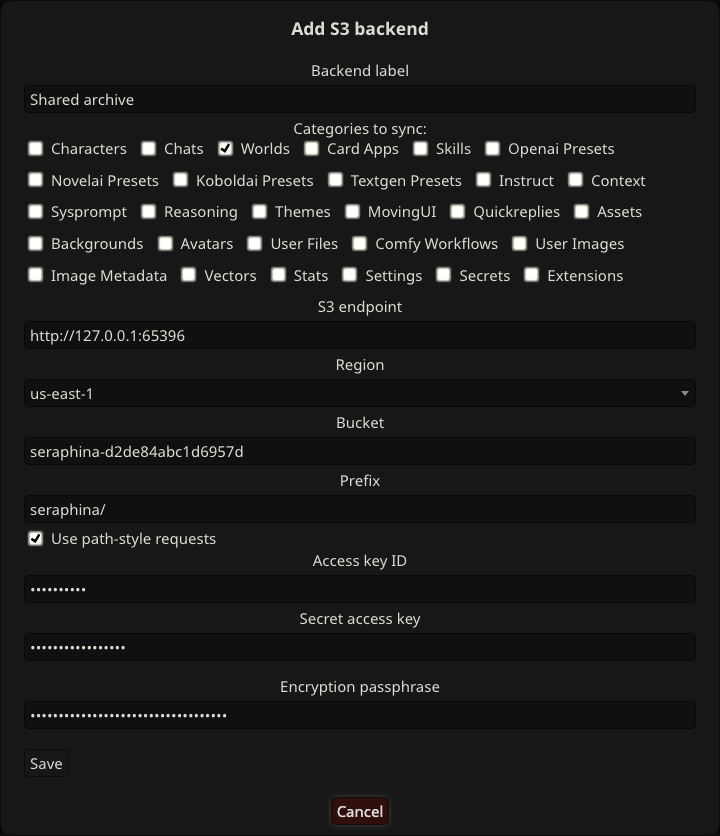
Choose Save. Setup checks conditional-write compatibility with temporary objects. A service that ignores the required write conditions is unsupported. Authentication failures, a missing bucket and connection failures are reported separately; they do not establish that conditional writes are unsupported.
After setup, the backend appears under Sync backends and sync starts. Use the overview to review activity and pending issues.
Join from another device
On the joining device, choose Add S3 backend and enter the existing endpoint, region, bucket, normalized prefix, credentials and the same Encryption passphrase. Select the intended categories and choose Save. Joining uses this form's passphrase field, not a separate automatic prompt. A wrong phrase is rejected; correct it in the form and save again.
Keep the passphrase somewhere safe. Losing it prevents a new setup from recovering the encrypted bucket data. If recovery is impossible, start from a device's available local data using a fresh empty bucket or prefix. Removing a backend or starting another namespace does not decrypt the old data; keep existing encryption metadata intact.
Encryption and credentials
Your browser sends entered credentials and the passphrase to your Luker server during setup. That server encrypts synchronized data before uploading it. The bucket's head and packs/ contents are encrypted; keyinfo.json contains public encryption metadata, not the passphrase.
The server stores the derived encryption key for automatic sync, rather than the passphrase, so normal sync does not repeatedly prompt. Backend lists and status responses do not return stored credentials or derived keys to the browser.
Encryption of bucket contents does not protect endpoint credentials sent over HTTP. Protect both the browser-to-Luker connection and the storage connection with HTTPS where available.
Edit, remove and unlock
Edit connection settings
Choose Edit on the backend row. Leave both credential fields and Encryption passphrase blank to retain the stored credentials and encryption key. To replace credentials, supply both fields; an incomplete replacement is rejected.
Before saving changes to the endpoint, region, path-style option or credentials, Luker checks access to the existing remote encryption identity. An endpoint edit must still reach the same encrypted namespace. Supplying a passphrase verifies that namespace's phrase; it does not change the phrase protecting the data.
Bucket and Prefix are read-only. To use a different namespace, Remove the backend and use Add S3 backend. This creates a different local backend and sync history, not a migration of the old backend. Remove leaves the remote bucket data and other devices unchanged.
Repair a stored key
Use Unlock when the error asks you to unlock the backend with its passphrase. Unlock repairs the stored encryption key only when the existing local key identity is valid and matches the remote identity.
If the stored identity is missing or invalid, or the remote identity changed, follow the error's Remove and Add S3 backend instruction. Unlock cannot adopt a different identity or rotate the encryption key. Missing or invalid encryption metadata must be restored from a valid copy; do not delete or overwrite it to force setup.
Troubleshooting and availability
| Reported problem | Action |
|---|---|
| The passphrase does not match this bucket and prefix | Check the namespace and use its original phrase. |
| Authentication failed | Check the credential pair and bucket permissions. |
| Bucket could not be found | Verify that it exists at the configured endpoint. |
| Endpoint could not be reached | Restore network/provider availability and check the endpoint and region. |
| Provider does not support conditional writes | Use a compatible storage service. |
| Private-address connection is disabled | Ask an administrator to check the private-address policy. |
| Encryption format is unsupported | Update Luker before syncing again. |
| Sync data is missing or invalid | Restore the bucket's sync data from a valid copy before syncing again; see recovery. |
S3 Sync is available on desktop, Android and HarmonyOS. Keep the Luker server running and able to reach the storage service. Automatic retries follow the normal sync triggers.
Changing the passphrase, rotating keys and automatic history compaction are not supported. Initial synchronization downloads the stored history, and bucket storage use grows as history accumulates.