Prompt Groups
Prompt Groups is an organizational feature added by Luker on top of SillyTavern's existing PromptManager. It allows users to group multiple prompt entries into named groups, displayed as collapsible groups in the prompt manager list, helping manage complex prompt structures.
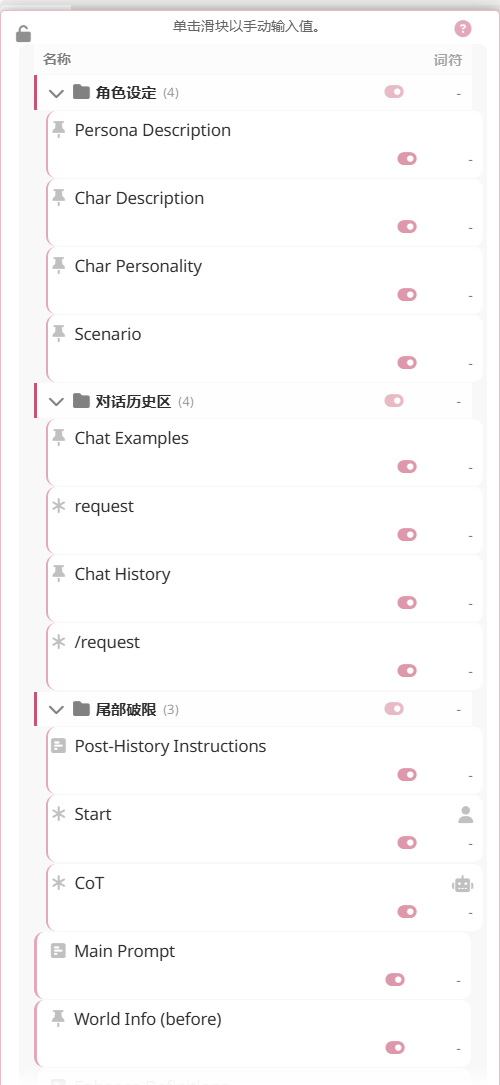
The screenshot above shows three groups (Character Setup / Chat History / Tail Jailbreak in Chinese) expanded — each header carries a member count and a bulk-enable switch, while ungrouped entries (Main Prompt, World Info before) stay at the top level.
Data Model
identifiers Field
Each group contains an identifiers array listing the prompt entries that belong to it. Membership is determined by the group referencing prompt identifiers, not by prompts pointing to a group:
// Prompt entry (no group reference)
{
    identifier: string,      // Prompt identifier
    enabled: boolean         // Whether enabled
}
Group Definition
Group definitions are stored independently in the preset, alongside prompt_order:
// Group definition
{
    id: string,              // Unique identifier
    name: string,            // Display name
    collapsed: boolean,      // Whether collapsed
    identifiers: string[]    // Ordered list of prompt identifiers in this group
}
Core Features
Purely Visual Organization
Prompt Groups are a purely visual organizational method that does not change the actual execution order of prompts. The final prompt arrangement is still determined by prompt_order — groups only affect how prompts are displayed in the manager UI. This means you can freely organize the visual structure without worrying about affecting AI behavior.
Collapsible Group Headers
Each group is displayed as a collapsible header row in the prompt list. Clicking the header expands or collapses all member entries within the group, making it easy to quickly locate and manage prompts among a large collection.
Batch Toggle
Through the group header, you can enable or disable all prompt entries within the entire group at once, without needing to operate on each one individually.
Token Statistics
The group header displays the total token count of all enabled prompts within the group, helping you monitor each group's context window usage.
Drag-and-Drop Sorting
Prompt entries support drag-and-drop sorting. During dragging, group relationships are maintained — group members move together with the header, and the group structure is not broken by drag operations.
Group Management
Creating Groups
New groups can be created in the prompt manager. After specifying a group name, you can drag prompt entries into the group.
Editing Groups
Renaming existing groups is supported. Changing a group name does not affect the association of its members.
Deleting Groups
When a group is deleted, the prompt entries within it are not deleted — they become ungrouped and return to the top-level list.
Relationship with Presets
Group information is saved and loaded with presets. When switching presets, the prompt group structure switches along with the preset. Different presets can have completely different group organizations.
Related Features
- Preset Groups — Group display in the preset selector
- Preset Completion Assistant — AI-assisted understanding and adjustment of preset parameters