Spec Mode
Spec is the orchestrator's default mode and the baseline that other modes are compared against. It splits the workflow into a sequence of Stages, each with one or more Nodes running serially or in parallel; stages run strictly serially — Stage 2 cannot start until every node in Stage 1 has finished. One node = one LLM call + one prompt template. The final stage produces the briefing that's injected into the main model; everything upstream is preparation for it.
You're already using it
When you toggle the orchestrator on, Spec is the default — and it ships with a working multi-stage workflow (distiller, planner, constraint, review, synthesizer…). This page is about modifying the default workflow, building a new one, and understanding why the default is shaped the way it is.
99% of the time, don't hand-edit
Before you hand-edit stages and nodes, take a look at the AI Iteration Studio — describe what you want in one sentence, the AI returns a proposal, you approve change-by-change. Hand-editing is reserved for the corner cases the Studio can't reach.
Concept refresher
A few terms become useful once you start customizing:
- Stage — a horizontal slice of the workflow. Stages run strictly serial; Stage 2 cannot start until Stage 1 finishes.
- Node — an execution unit inside a stage. One node = one LLM call + one prompt template.
- DAG — directed acyclic graph. In plain English: "a flowchart with order, no loops."
Each stage has one of two execution modes:
- Serial — nodes run one after another within the stage.
- Parallel — nodes run concurrently with
Promise.all.
Each node is either a worker (does work) or a review node (validates the previous stage's outputs).
Default orchestration flow
Spec is a fixed pipeline. The default ships with five stages and seven workers — distiller reads the scene, then lorebook_reader + anti_data_guard lock in constraints in parallel, then planner + recall_relevance plan the next beat in parallel, then critic reviews (and can send the previous stage back for another pass), and finally synthesizer writes the capsule.

The default agents at a glance:
| Agent | Purpose | Concrete RP example |
|---|---|---|
distiller | Compact, evidence-grounded scene-state snapshot (user intent, active tensions, likely direction); everything downstream reads it. | Returns "Lin Wan asked about Luoyang for the first time since msg 12; she's deciding whether to trust the user with her family story". |
lorebook_reader | Extracts the hard constraints from active lorebook entries that must affect this turn (style bans, narration boundaries, role / taboo rules, continuity anchors), phrased as actionable writing directives. | Returns "Luoyan-MainCity is besieged this season — Lin Wan can't have left it casually; narration must not break the siege tension". |
anti_data_guard | Blocks report / observation / metric / weather-broadcast prose; flags violations as BLOCKERs with concrete rewrite directives. | Catches "Lin Wan's anxiety: 7/10" — BLOCKER. Rewrite directive: "show it in clenched fingers, not a number". |
planner | Proposes the next-step progression beats with clear causality, preserving character independence and world autonomy; doesn't bend the world around the user. | Beats: "Lin Wan deflects → user presses → she lets one detail slip → main reply ends on that detail". |
recall_relevance | Picks which recalled memory cues should actually influence this turn, ordered by immediate relevance; never invents unseen facts. | "msg-18 grandmother memory: HIGH relevance; msg-3 weather note: skip". |
critic (review node) | Audits the previous worker stage against the full review checklist (continuity, OOC, lorebook compliance, anti-data, world autonomy, …) and either approves or requests rerun of specific upstream workers. Never rewrites — only judges. | "Approve grounding; reject reason — planner had Lin Wan leaving besieged Luoyan, contradicts lorebook. Rerun planner: she stays in the city." |
synthesizer (finalize node) | Merges the approved worker outputs and the critic's feedback into the single guidance capsule that ends up injected into the next reply. | Capsule: "Lin Wan is anxious about the Luoyang topic; she'll deflect but let one family detail slip. Keep her in the besieged city. No data-style narration." |
Manual: Spec workflow editor
For fine-grained customization that the Studio can't reach, edit stages and nodes directly. From the orchestrator panel: Open Orchestration Editor.
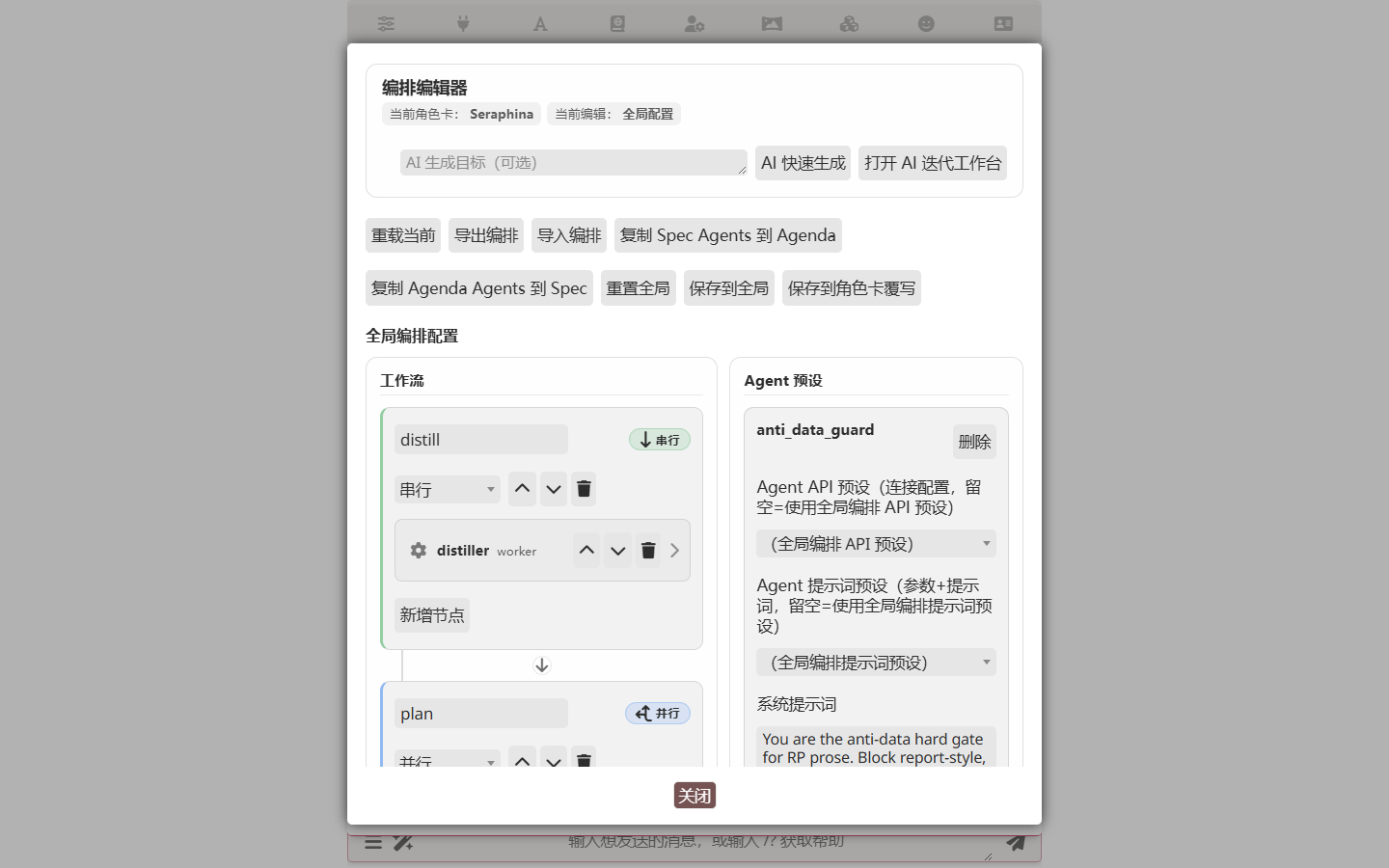
Left panel is the workflow (stages and their nodes). Right panel is the agent preset library. Each node references one preset, which carries the system prompt, user prompt template, optional API/Chat-Completion preset overrides, and execution flags.
Template variables
User prompt templates support these placeholders:
| Variable | Meaning |
|---|---|
{{recent_chat}} | Recent chat messages |
{{last_user}} | The most recent user message |
{{previous_outputs}} | Outputs from preceding stages |
{{distiller}} | The distiller node's output specifically |
{{previous_orchestration}} | Previous turn's orchestration result. Auto-prepended at runtime — you typically don't need to reference it. |
Review nodes
A review node checks the previous worker stage's outputs and uses two dedicated tool calls:
| Tool | Purpose |
|---|---|
luker_orch_review_approve | The work is good; advance to the next stage. |
luker_orch_request_rerun | One or more nodes need to redo their work; suggests changes. |
Constraints:
- A review node only sees and re-runs nodes from the immediately preceding worker stage.
- Reruns are scoped to specific node IDs, not the whole stage.
- Rerun count is bounded by Review Rerun Max Rounds (default 2). When set to 0, the review node decides only "approve or fail" — no reruns.
- After rerun, the review node runs again, forming an "execute → review → rerun → re-review" loop until approved or the limit is hit.
- Review nodes must emit review feedback.
Common Recipes
| I want… | Do this |
|---|---|
| AI to plan its scene before writing | In the AI Iteration Studio, ask for "two stages — first plans the next beat, then writes the prose" |
| AI to stop breaking character | Enable Anti-Data Guard; in the AI Iteration Studio, ask for "a Constraint Agent that hard-blocks meta-commentary" |
| Same workflow across all cards | Apply at global scope (don't bind to a card) |
| Different workflows per card | Open the Studio with the target card selected, then Apply to Character Card |
| Cheaper / faster | See overview → Step 2; or switch to Single Agent mode (one node, one call) |
| Tweak a workflow I built | Studio session — they persist |
| Migrate to another machine | See overview → Import / Export |
| Reset everything | The orchestration editor has a Reset to Default button |
Watching a Spec run
The Run Panel shows every Spec run live. Each stage is a card you can expand to see the worker's reasoning, the streamed output, and any tool calls. Spec-specific things to look for:
- Node execution count — how many times any worker ran across the whole DAG.
- REVIEW rerun count — reruns driven by review nodes (default capped at 2; bumpable to 0 to disable or up to 20 in the configuration reference). If a stage triggers a rerun, you'll see the same worker render twice in the panel.
- Per-stage output shape — set by each node's prompt template. The distiller, for example, typically produces a
summaryfollowed by anxml_guidanceblock with<story_state>/<location>/<key_items>tags that downstream stages parse. - The capsule — the last stage's output is the text packaged into the main model's context. Everything upstream feeds it.
Use Export at the top of the panel to download the run as JSON (handy for bug reports).
Spec configuration reference
Spec-specific settings
| Setting | Description |
|---|---|
| Node Iteration Max Rounds | Iteration cap for a single node |
| Review Rerun Max Rounds | 0 disables review-driven reruns |
| Anti-Data Guard | A built-in node in the default Spec workflow that blocks data-fication / report-style prose (terms like 观察 / 分析 / 评估 / 监测 / observation / analyze / metric / probability that turn RP into stat blocks). Hard-coded ~18-term lexicon. Remove the node from your workflow if you don't want it. |
| Node API Preset | Per-node override; empty = global |
| Node Chat Completion Preset | Per-node override; empty = global |
Each node can use a different API and Chat Completion preset, so you can route distillers to a cheap model and the synthesizer to a high-quality one.
Related
- Orchestrator overview — common configuration / triggers / character card binding
- AI Iteration Studio — let AI customize Spec for you (recommended for 99% of cases)
- Single Agent mode — degenerate Spec, single node
- Agenda mode — Planner-driven dynamic dispatch
- Loop mode — single-agent tool loop
- Character Card Editor — shares the diff engine with Iteration Studio
- Custom tools — extension / SillyTavern-bridged / handwritten tools the spec agents can call
Presets
This mode's configuration can be saved as a named preset and switched in the editor panel. See Orchestration Presets for the full workflow.