Per-Message Variables
Luker introduces per-message variables on top of SillyTavern's existing variable system: AI replies can write variables that are extracted, structured, persisted with the message, and replayed deterministically when chat history changes — so deleting a message, switching swipes, or regenerating a reply leaves your variables in the right state automatically.
Why this exists
In stock SillyTavern, side-effect macros like {{setvar::hp::50}} only run when they appear in a prompt template (preset, world info, or the very first message). If the AI writes the same literal in its reply, nothing happens — the macro is just text. Even worse, when the literal is rendered to the user it shows up verbatim, polluting the narrative.
Luker fixes this by extracting side-effect macros out of AI / user messages at save time, recording them as structured ops attached to that message, and replaying them when needed. The literal is removed from the visible text; the operation is preserved as data.
How it works

Extraction
When a message is saved (AI reply, continue, regenerate, swipe, or user message), Luker scans mes for the recognized side-effect macros:
{{setvar::name::value}}{{addvar::name::value}}{{incvar::name}}{{decvar::name}}{{deletevar::name}}{{pushvar::name::value}}{{popvar::name}}
Every recognized op also accepts a dotted name ({{setvar::roster.alice.hp::50}}) — see the structured object workflow below.
For each match in source order:
- Any nested display macros inside the value (e.g.
{{user}},{{getvar::other_key}},{{time}}) are resolved against the current state. - The op is forward-applied to
chat_metadata.variablesimmediately, so subsequent ops in the same message see the result. - A structured record is appended to
message.extra.var_ops. - The literal is stripped from
mes.
The chat now shows clean narrative; the variables are up to date; the operation history is queryable.
Sequential resolve
Two ops in the same message that depend on each other work as expected:
{{setvar::a::1}} {{setvar::b::{{getvar::a}}}}After extraction: a = 1, b = 1. Each macro is fully resolved and applied before the next is processed.
JSON-shaped values
A value ending in a literal } (typical for {"x":1} or [1,2] payloads) puts three } in a row at the end of the macro — one for the JSON, two for the macro close. The scanner treats the last }} in any trailing run as the macro close, so {{setvar::config::{"x":1}}} parses as expected without escaping.
The flip side: a macro followed by a literal } in narrative text (e.g. ... {{macro}}}) absorbs that } into the value. Insert whitespace ({{macro}} }) when you need the macro and the trailing } to stay separate.
Replay on structural changes
When something changes the chat structure, Luker rebuilds the relevant parts of the variable cache:
| Event | What we do |
|---|---|
MESSAGE_DELETED | Replay surviving ops; only keys that appeared in the surviving log are touched |
MESSAGE_SWIPED | Replay (the active swipe's extra.var_ops is now in scope) |
MESSAGE_SWIPE_DELETED | Replay |
CHAT_CHANGED | Replay against the freshly loaded chat |
MESSAGE_EDITED | Replay (does not re-extract — editing the narrative will not fire setvar) |
The replay is deliberately minimal: it only touches keys that are mentioned somewhere in the surviving op log. Any variable written by some other source — world info side effect, slash command, Quick Reply, third-party extension, legacy chat metadata — is left exactly where it was.
Swipe lifecycle
var_ops lives on message.extra, which SillyTavern already mirrors per swipe via swipe_info[i].extra. Switching swipes hands you the right ops for free.
When a new swipe begins generating, clearMessageData drops the previous swipe's var_ops (Luker added it to the whitelist), so extraction starts from a clean slate.
Continue
A continued reply appends new tokens to the existing mes. Because the previous extraction already stripped its literals out of mes, the next extraction pass simply sees the new portion and appends new ops to the same var_ops array. No timestamps, offsets, or flags required.
Operation panel
Every message that carries any op-log gets a small flask icon in its button row:
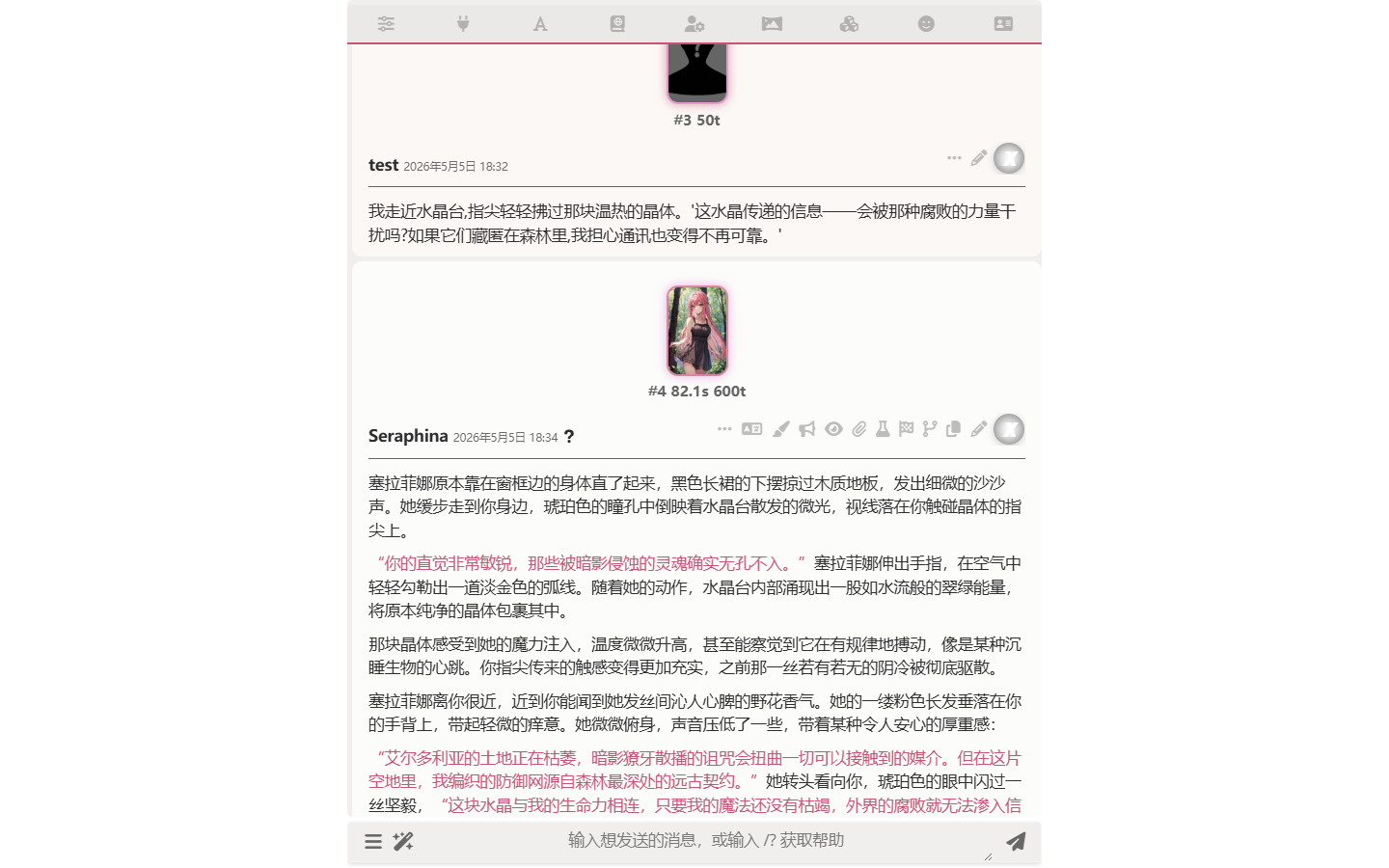
Clicking it opens a panel where you can:
- See every operation recorded for that message.
- Edit
op,key, orvalueinline. - Delete an operation.
- Add a new operation.
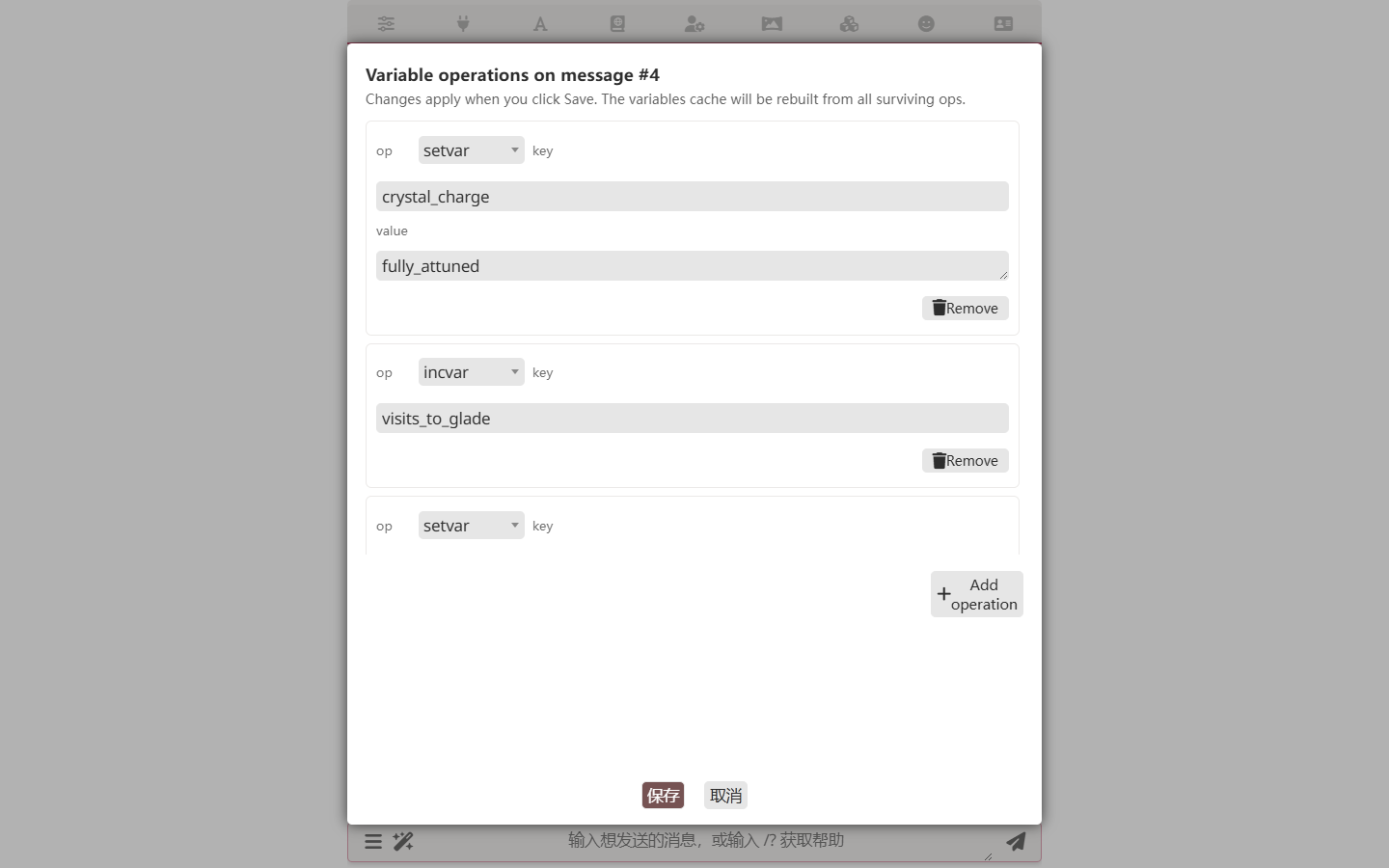
When you save, the message's op array is replaced with your edits, the cache is rebuilt, and the chat is persisted. This is the recommended way to manually adjust variables — it lands the change at a specific message in the timeline so future structural changes (delete, swipe) preserve the intent.
Coexistence with other variable sources
| Source | Behavior |
|---|---|
World info {{setvar}} | Runs at prompt assembly via stock SillyTavern. Cache is overwritten with the WI value each time. To make WI act as initialization rather than per-turn override, place its variable-setting entries at high depth / front of prompt. |
Preset {{setvar}} | Same as world info. |
Slash command /setvar | Writes directly to chat_metadata.variables. Survives until the next replay touches the same key — i.e. as long as no surviving AI op mentions that key. |
| Quick Reply scripts | Same as slash command. Keep QR-managed variables on names that AI ops do not touch. |
{{setglobalvar}} and friends | Not extracted. Global variables live outside the chat-local op-log. They follow stock SillyTavern semantics. |
Recommendation for character authors
If a variable is meant to be owned and mutated by AI during the roleplay, expose it through AI-authored {{setvar}} calls and never write to it from world info or QR.
If a variable is meant to be set up once at the start of a chat, use the character card's first message or an alt greeting — those are extracted into chat[0].extra.var_ops like any other source.
If a variable is meant to be a per-turn render-time override (e.g. weather based on current location), keep it in world info; the cache will be overwritten each turn and that is the correct behavior.
When to use variable-driven UI
When some fields need to change as the conversation advances and some UI consumes them — a CardApp panel, a world book entry, a custom renderer — model them as chat variables. Three production paths:
- setvar bootstrap in
first_mes/ alt greetings for initial values - world book entries instructing the AI to emit setvar in its replies
- the AI emitting setvar directly in replies
Consumers read via getvar; the UI re-renders whenever chat_metadata changes.
This pattern fits "narrative-header" data — current chapter / phase, active quest progress, location status, the headline of an ongoing case, and similar fields whose values advance with the plot.
Storage layout
chat[i] = {
    "mes": "...narrative with side-effect macros stripped...",
    "extra": {
        "var_ops": [
            { "op": "setvar", "key": "hp", "value": "50" },
            { "op": "setvar", "key": "roster", "path": "alice.hp", "value": "50" },
            { "op": "incvar", "key": "turn" }
        ]
    },
    "swipe_info": [
        { "extra": { "var_ops": [...] } },
        { "extra": { "var_ops": [...] } }
    ]
}
chat_metadata.variables remains the SillyTavern-native cache and the source of truth for {{getvar}}. The op-log is the origin of the values that we own; the cache is the runtime view of all sources combined.
When an op carries a path, op.key is still the top-level variable name — the path is a sub-selector inside the JSON-encoded value of that variable. The op log keeps the rollback unit at the top-level key. See structured object workflow below.
Structured object workflow
Path-aware ops let one variable carry an entire structured payload — an NPC roster, an inventory dict, a quest journal — that the AI mutates one leaf at a time across the conversation. Instead of rewriting the whole blob each turn (which would lose granularity in the op log and make swipes look like full-state rewrites), the AI emits one op per change:
{{setvar::roster.alice.hp::50}}              <!-- introduce Alice -->
{{setvar::roster.alice.mood::cautious}}      <!-- describe her state -->
{{pushvar::roster.alice.inventory::dagger}}  <!-- give her a dagger -->
{{setvar::roster.alice.hp::40}}              <!-- she takes damage -->
{{deletevar::roster.bob}}                    <!-- Bob leaves the party -->
op.key is always the top-level variable name (roster in the example above), so the tracked-keys / replay / swipe-restore logic treats the whole structure as one unit. Deleting the message that wrote a particular leaf rebuilds the structure from the surviving ops, naturally reverting that leaf — roster as a whole stays consistent with whatever the surviving timeline says.
This is the recommended pattern for any variable that holds a structured collection an AI maintains across turns: NPC rosters, party inventories, quest logs, relationship maps, location states. The per-leaf granularity gives delete / swipe / branch the smallest possible unit of rollback, and renders naturally with {{each::roster}}…{{/each}} against the JSON object stored under the top-level key.
Rendering structured variables — loop_value
Chat variables hold any JSON-serializable value, so a structured collection (an NPC roster, a quest journal, an inventory map) can live in a single variable and be rendered into the prompt or a world book entry on each pass.
Path access —
{{getvar::npcs.alice.hp}}parses the JSON stored innpcsand walks the dotted path. Missing intermediate keys / failed parse / non-iterable head → empty string. Falls back to a literal flat-key lookup when the head segment isn't JSON, so a variable nameda.bstill works.Iteration —
{{each::npcs}}{{loop_key}}: {{loop_value::hp}}{{/each}}walks the collection (objects → key/value pairs, arrays → string-index/element pairs). Inside the body:{{loop_key}}— the current key (or the array index as a string){{loop_value}}— the whole value (objects auto-JSON-stringify){{loop_value::path}}— drill into the value via dotted path, same semantics as{{getvar}}
Both shadow naturally when
{{each}}is nested. The collection argument also accepts an inline JSON-array literal ({{each::["sword","shield"]}}) and a nested macro that resolves to a collection ({{each::{{getvar::roster}}}}), so you can iterate without round-tripping through a named variable.
This is what makes "variable holds a JSON object → world book entry renders it" a complete pattern: the AI maintains the structure with {{setvar::npcs::...}}; an entry's body uses {{each::npcs}}…{{/each}} to lay it out for the prompt.