Agenda Mode
Agenda replaces Spec's static DAG with a Planner agent. The Planner maintains a todo list, dispatches other agents via tool calls, reads their outputs, and decides who to send next — at its core, an agent loop.
When to reach for Agenda over Spec:
- The flow needs to decide who runs based on intermediate findings. For example, "first scan the user's message for OOC tendencies; only spin up the Constraint Agent if there are any" — that conditional shape is awkward in Spec's fixed DAG.
- You want flexible multi-agent coordination instead of a fixed stage → node topology.
- You want the Function Call Runtime machinery to let the Planner organize dispatch itself.
Agenda is not a Spec replacement
Spec wins on predictability, prompt-cache friendliness, and debug ergonomics. The fixed DAG is enough for the vast majority of RP scenarios; Agenda is for cases that genuinely need dynamic dispatch.
99% of the time, don't hand-edit
Before you hand-write a Planner prompt, check the AI Iteration Studio — describe what you want in one sentence, the AI returns a Planner + agent pool proposal, you approve change-by-change.
Agenda editor
Switch to Agenda mode, then click Open Orchestration Editor in the orchestrator panel.
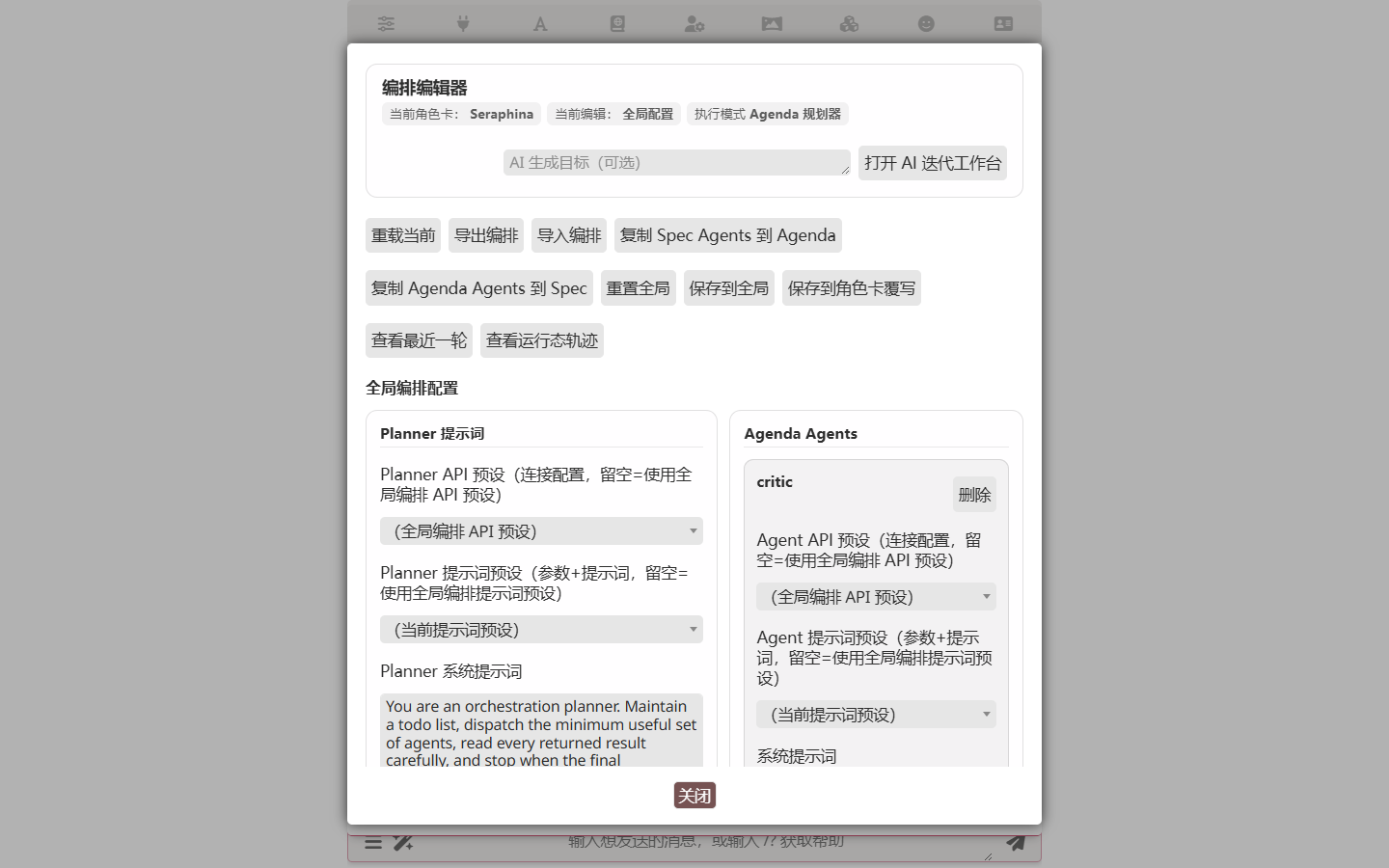
The left column configures the Planner Prompt (API preset, prompt preset, system prompt, planner prompt template). The right column lists the available Agenda Agents — the Planner picks from this pool via tool calls.
Planner
The Planner is Agenda's core. It does several things:
- Reads recent chat + user message
- Maintains a todo list (what to do next)
- Dispatches agents from the Agenda pool to do tasks
- Collects agent outputs
- Decides the next step from collected output, or stops when satisfied — the last agent's output becomes the capsule injected into the main model.
Agenda Agents
Each Agenda Agent is similar to a Spec Node: own System Prompt, User Prompt Template, optional API / Chat Completion preset overrides. The difference: an Agent isn't bolted to a stage. When and how often it's invoked — or whether it's invoked at all — is the Planner's call.
Three runtime bounds
Agenda is dynamic dispatch, so runaway is easy. Three guards:
- Planner Max Rounds — how many scheduling rounds the Planner gets
- Max Concurrent Agents — concurrency cap on parallel agent runs (passed to
Promise.all) - Max Total Executions — total number of agent invocations across the whole run
Hitting any one forces the run to wrap up.
Default orchestration flow
Agenda hands the wheel to a Planner agent that schedules a pool of workers per turn. The default profile ships the Planner plus five workers — distiller, lorebook_reader, planner, critic, and finalizer. Each round the Planner picks one or more workers from the pool, reads their results back, and replans if needed; once the board is resolved, finalizer writes the capsule.

The default agents at a glance:
| Agent | Purpose | Concrete RP example |
|---|---|---|
Planner (loop driver, not a worker) | Reads the chat and user message, maintains the todo board (add / set_status / drop), picks one or more workers from the pool each round to dispatch, reads their results, and decides whether to keep planning or hand off to finalizer. | Round 1: dispatches distiller + lorebook_reader in parallel. Round 2: outputs read; decides the scene also needs planner + critic. Round 3: hands off to finalizer. |
distiller | Compact, evidence-grounded scene-state read (user intent, active tensions, immediate direction); written for the Planner and downstream agents, not for the player-facing reply. | "Lin Wan probing user's stance on the Luoyang topic; will change subject completely if user redirects." |
lorebook_reader | Extracts only the lorebook / world-info constraints that materially matter this turn — phrased as practical writing / behaviour constraints, not lorebook summary. | "Luoyan is besieged — Lin Wan cannot have left. Style: archaic register; she'd say '不知怎的' not 'somehow'." |
planner | Scene-progression analyst — proposes what next-step beats or decision points matter, with causality preserved and the world not bent around the user. | Beats: "user presses → she deflects → he tries a different angle → she lets one Luoyang detail slip → reply ends there". |
critic | Audits the material the Planner hands it (continuity breaks, OOC drift, missing hard constraints, anti-data, implausible causality); returns the audit, never rewrites the guidance itself. | "Plan has Lin Wan saying 'no big deal' — modern register, OOC for this character. Rest is OK." |
finalizer (Final Agent — runs once at the end) | Reads the resolved todo state and the selected prior runs and merges them into one concise orchestration guidance text. That text becomes the capsule injected into the next reply. | Capsule: "Lin Wan: deflect → press → slip-of-tongue about her aunt in Luoyang. Archaic diction. She's still inside besieged Luoyan." |
AI Iteration Studio
Like Spec, Agenda is supported by the AI Iteration Studio — describe Planner behaviour and agent pool composition in natural language, let the AI assemble it. See AI Iteration Studio. Quick Build is available in Agenda too.
Conversion to/from Spec
The orchestration editor has Copy Spec Agents to Agenda / Copy Agenda Agents to Spec buttons that move the agent pool across modes (best-effort). Caveats:
- Spec → Agenda loses stage topology. You'll need to author a new Planner Prompt to describe the dispatch logic.
- Agenda → Spec can't fully capture the Planner's dynamic dispatch. You'll need to manually decide stage boundaries.
Function Call Runtime dependency
Agenda's Planner dispatch is implemented via OpenAI tool calls and depends on Luker's Function Call Runtime. That means:
- The Planner's connection profile must support function calling (OpenAI / Claude / Gemini all do)
- Tool-call retry on failure is handled by Function Call Runtime (see that page for details)
Watching an Agenda run
The Run Panel shows every Agenda run live. Each Planner round is a card; each dispatched worker is a sub-card under that round, expandable to see its full reasoning and output. Agenda-specific things to look for:
- Planner output per round — the
todo_opslist (set_status/add/set_goaland friends), expanded inline. When the Planner sends to the wrong agent, skips a step, or falls into a loop, cross-reference these ops with the worker outputs to find the root cause. - Worker dispatches — every worker the Planner runs in a round appears under that round's card. Expand to inspect inputs and outputs.
- Final Agent output — the run's last worker (default
finalizer) produces the capsule actually injected into the main model. The configuration reference shows how to swap it for a different agent id. - Event density — Agenda runs typically produce 20+ events because Planner rounds and every dispatch are recorded; expect a busier panel than Spec.
Use Export at the top of the panel to download the run as JSON (handy for bug reports).
Agenda configuration reference
Agenda-specific settings
| Setting | Description |
|---|---|
| Planner Max Rounds | Cap on Planner scheduling rounds |
| Max Concurrent Agents | Concurrency cap on parallel agent runs |
| Max Total Executions | Total agent invocations across the whole run |
| Planner API Preset | Connection profile used by the Planner |
| Planner Chat Completion Preset | Prompt preset used by the Planner |
| Planner System Prompt | The Planner's system instruction |
| Planner Prompt Template | The Planner's user prompt template |
| Final Agent | Whose output becomes the capsule when the run wraps up |
| Agenda agent pool | Per-agent presets / prompts (each can override API and Chat Completion preset independently) |
Related
- Orchestrator overview — common configuration / triggers / character card binding
- AI Iteration Studio — let AI write the Planner + agent pool (recommended)
- Spec mode — the default DAG mode
- Loop mode — single-agent tool loop
- Function Call Runtime — the framework Planner dispatch relies on
- Custom tools — extension / SillyTavern-bridged / handwritten tools that Agenda Workers can call
Presets
This mode's configuration can be saved as a named preset and switched in the editor panel. See Orchestration Presets for the full workflow.