Loop Mode
Loop mode runs a single agent that calls tools in the same conversation across multiple rounds, deciding for itself when to wrap up — no DAG to draw, no Planner prompt to author.
Loop mode strikes the balance between speed and quality: smarter than Single Agent (it can iterate with tools — query memory, look up the lorebook, browse chat) and faster than Spec / Agenda (one preset for the whole pass, so the prompt cache keeps hitting; spec rebuilds the cache every stage transition).
When it shines: you want one agent to do research-style work — read recent chat, look up the lorebook, browse the memory graph, jot persistent notes — and then produce a tight capsule injected into the main reply. The agent should be free to adjust its next move based on what the previous tool call returned, instead of marching through fixed stages.
Coexists with Spec / Agenda
Loop coexists with spec / agenda. Existing spec / agenda profiles are unaffected.
99% of the time, don't hand-write the system prompt
Don't want to hand-write the agent's system prompt? Open the AI Iteration Studio — describe the agent in plain language, the AI patches the profile via tool calls.
What and why
Spec / Single / Agenda all model "multiple agents collaborate to produce a single main reply", with stage-to-stage hand-offs via previousNodeOutputs. That design hits friction in a few places:
- Setup overhead. Spec needs a DAG; Agenda needs a Planner prompt.
- Stage-switch cost. Each stage rebuilds its system prompt / preset, which kills prompt-cache hit rate and stacks end-to-end latency.
- Context discontinuity. Stages only pass
previous_outputs; the agent's mid-flight reasoning is lost. - Rigid topology. The DAG is hard-wired; the agent cannot adapt the path based on what it found mid-run.
Loop mode addresses these with a single agent + tool loop: same conversation, one preset, the messages array keeps growing, and the agent decides what to call next from the previous round's results. It calls finalize(capsule_text) to stop. The core benefit is context continuity — tool calls and their results live naturally in messages, no manual variable threading.
Default orchestration flow
Loop runs a single agent. The agent reads what it already has, decides whether to fetch more context or write the capsule, and repeats until it calls finalize.

Switch to Loop
Pick Single-agent loop (loop) from the execution mode dropdown in the extension drawer. The spec / agenda boards collapse and a dedicated Loop board appears.
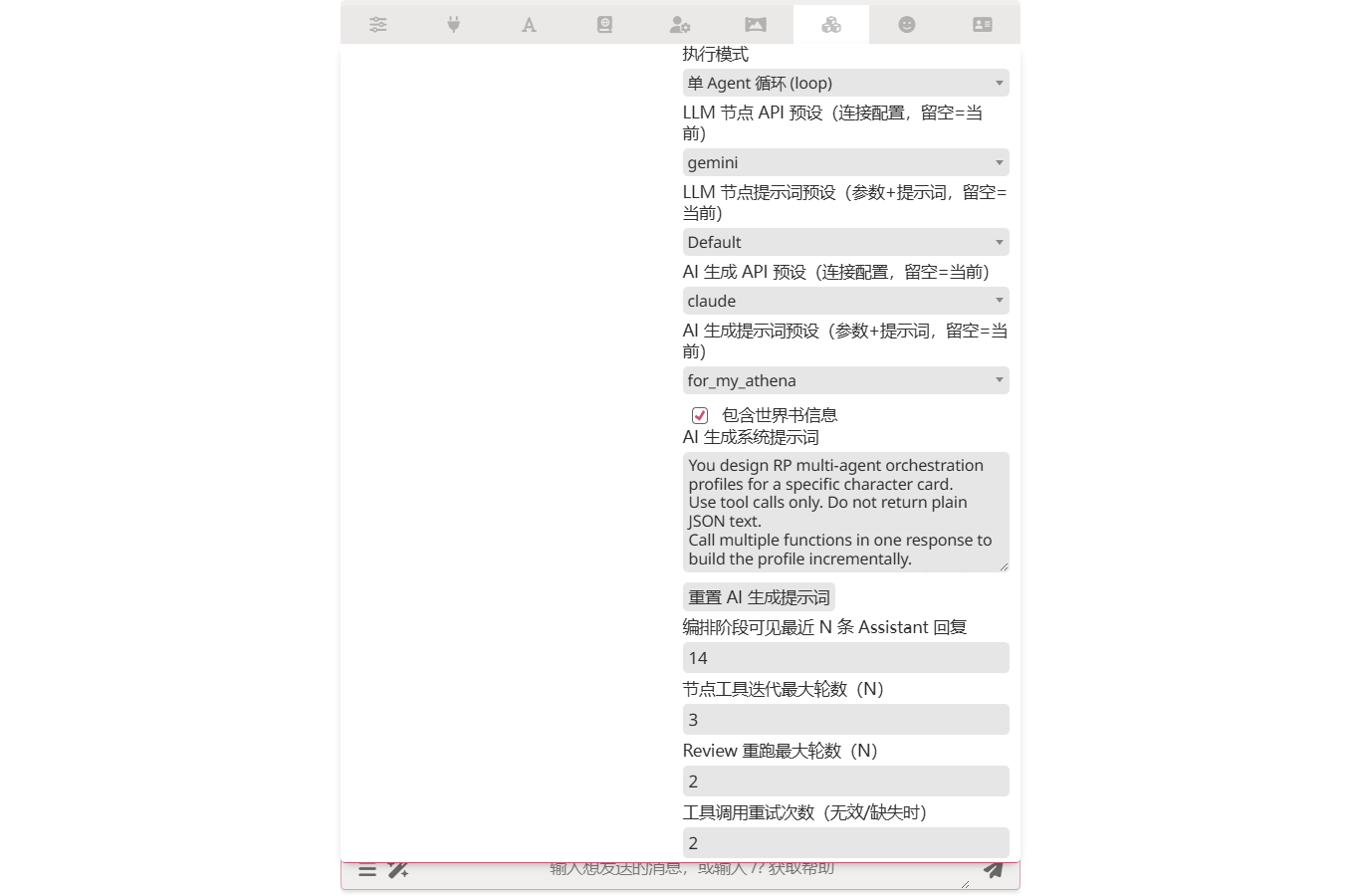
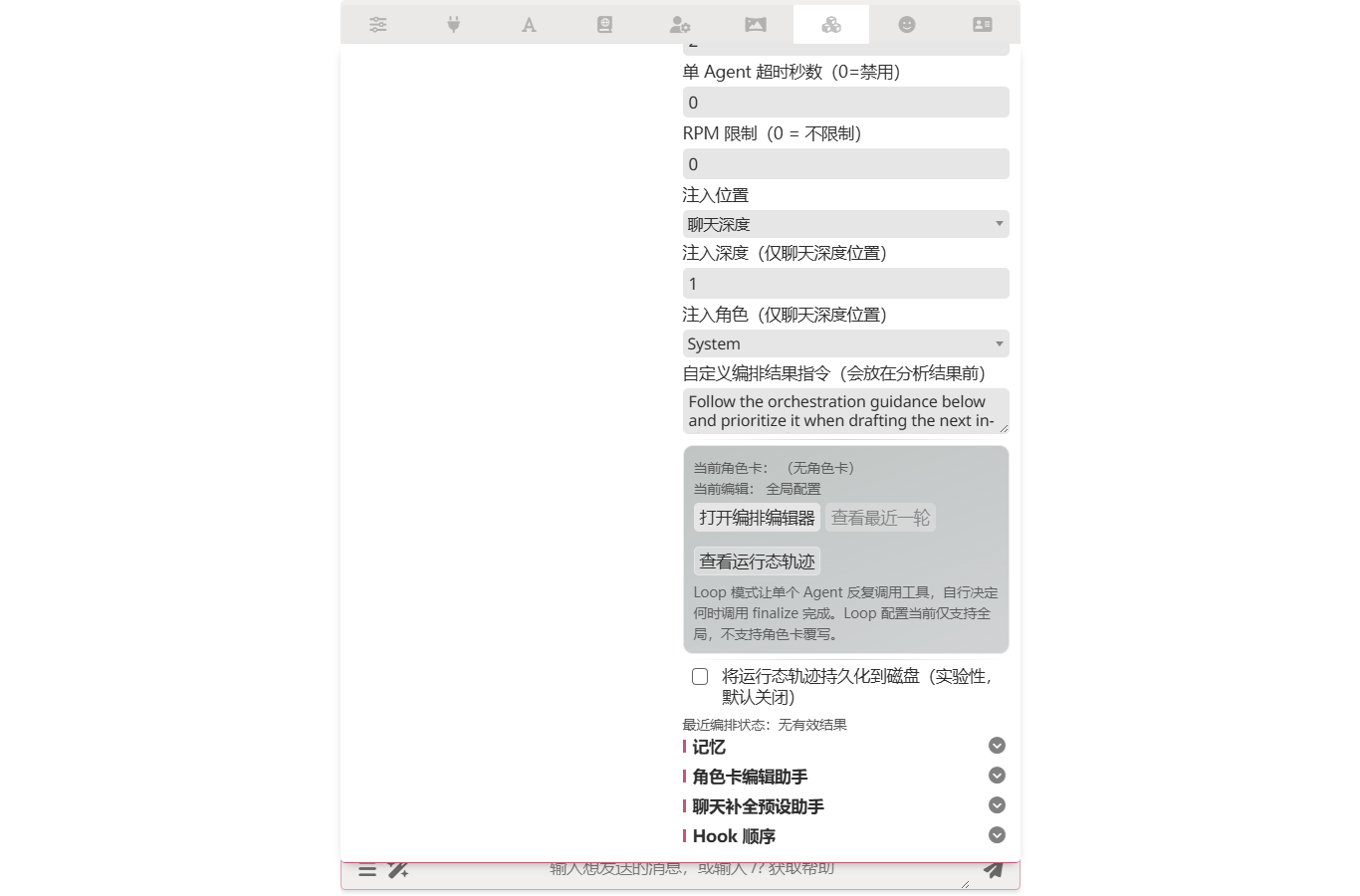
Editor
Click Open Orchestration Editor to open a two-column workspace — the left column holds the agent's preset routing, system prompt and two budget guards; the right column groups tool toggles by namespace.
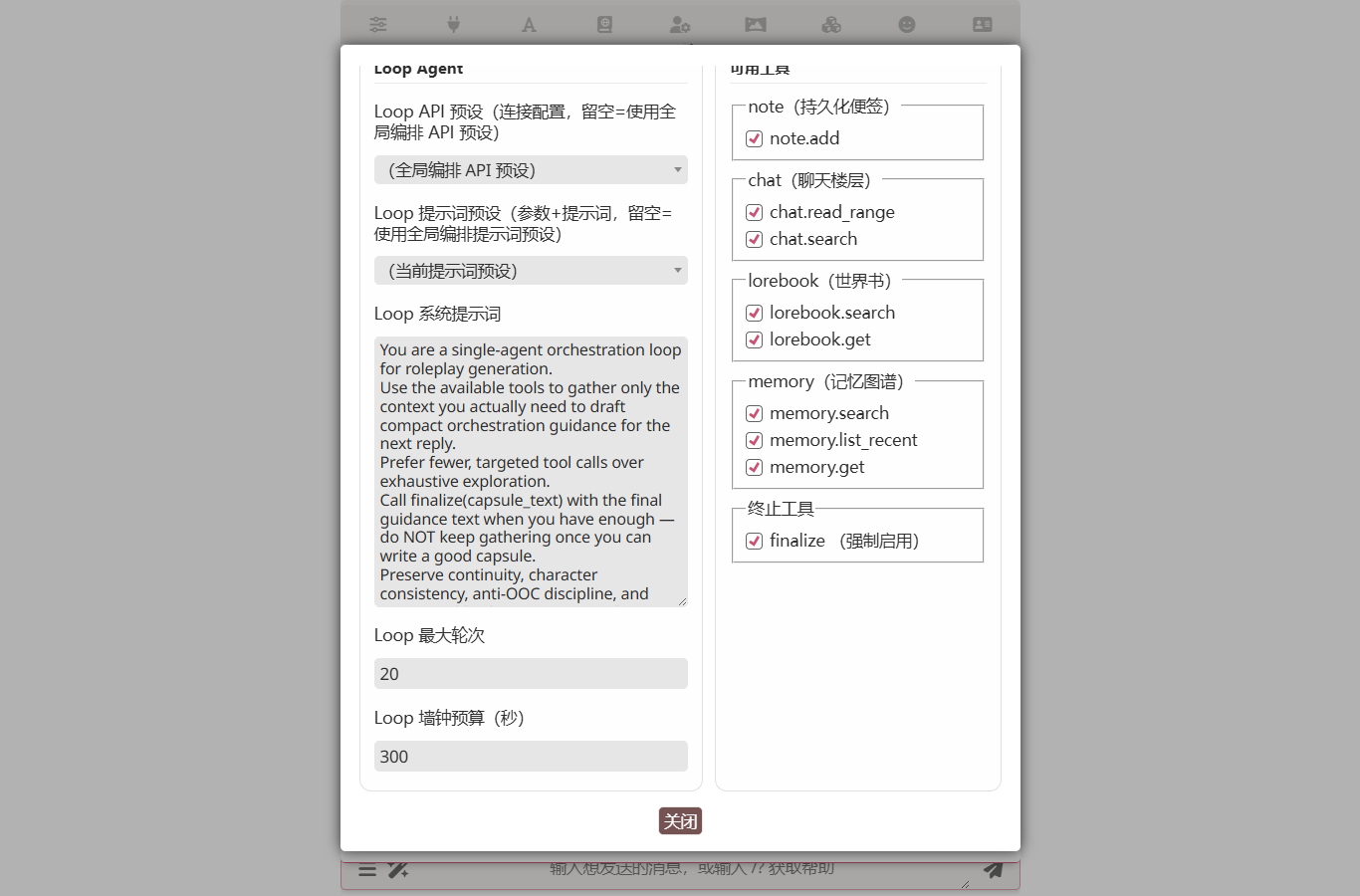
Key fields:
- Loop system prompt — the agent's role and task description. Tell it explicitly when to call
finalize. Most loop runs that go off the rails do so because the agent never decides to stop. - Loop max rounds (default 40) — one round = one LLM request + processing the tool calls it returns.
- Loop wall-clock budget (default 300 seconds) — the whole-loop wall-clock cap. The loop breaks when this expires regardless of round count.
- Tool toggles — namespaces you uncheck are dropped from the agent's tool schema.
finalizeis forced on and cannot be disabled. - Loop API preset / Loop preset — empty = use the global orchestration presets. Same routing semantics as spec / agenda, so the loop can target a cheaper model independent of the rest.
Built-in tools
Tools follow the OpenAI function-calling protocol; results come back as role: tool messages in the agent's next round. Twenty-four optional tools plus the always-on finalize:
| Tool | Purpose | Concrete RP example |
|---|---|---|
note_open(text) | Open a new plot-author thread (foreshadowing, promise, chapter outline). The note appears in the agent's "## Open Notes" block on every subsequent run until you close it. Max 16KB per note. | The agent realizes it just planted a setup and calls note_open('Lin Wan: grandmother in Luoyang — payoff next visit'); subsequent runs surface that thread. |
note_close(id, reason?) | Close an open note by id (it has been deployed, or is no longer needed). The note drops out of the "## Open Notes" block but stays archived. | After the chapter beat lands, note_close('o_a3f2', 'grandmother visit happened in floor 73'). |
chat_read_range(start, end) | Read a range of chat floors. Negatives count from the tail; ≤ 50 floors per call. | chat_read_range(-10, -1) reviews the last 10 floors for context. |
chat_search(pattern, flags?) | Regex search across all chat floors. Returns grep -n style output, one matched line per result: floor_N [role]:lineno: line. Flags default to gm; g is auto-injected. Pair with chat_read_range to pull full context for a hit. | chat_search({ pattern: '宴会|庆典', flags: 'gm' }) surfaces every floor mentioning a banquet or celebration. |
lorebook_search(pattern, flags?, book?) | Regex search across all enabled lorebook entries. Returns grep -n style output: [book] entry_name:lineno: line. Excludes entries already activated this turn — they're injected into the main context anyway. Pass book to narrow to a single lorebook by name. | lorebook_search({ pattern: '李府', book: 'main' }) finds every mention of the Li manor inside the main lorebook. |
lorebook_get(entry_key) | Pull an entry by key, full text. Does not deduplicate — the agent can quote an already-activated entry verbatim to keep terminology consistent. | lorebook_get('Luoyan-MainCity') retrieves the full entry for direct quotation. |
lorebook_force_activate(book_name, uids) | Write tool, off by default. Inject one or more dormant lorebook entries into the main model's <world_info> channel for THIS turn. The model cannot tell the forced entries apart from naturally-activated ones. Bypasses the World Info token budget — forced entries will silently evict chat history if you push too much; force only what the turn truly needs. Does not trigger recursive key scanning. Enable when the agent should curate lore per-turn (e.g. surface a specific NPC bio when their name comes up). Works in loop / spec / agenda; not in director (timing). | lorebook_force_activate({ book_name: 'main', uids: [42, 87] }) to push the elder council bio and the trade-route note when the chat turns to politics. |
memory_list_candidates(seq_window?, types?, exclude_recent_messages?) | Enumerate the visible memory-graph candidate pool — the same pool the memory-graph's own recall LLM sees. Returns { candidates: [{ id, type, level, title, seqTo, semanticDepth }] } in recency-first order. First step of a recall pipeline. | memory_list_candidates({ types: ['event'] }) returns the recent event nodes the recall LLM would consider. |
memory_keyword_search(query, types?, k?) | Token-intersection search across node title + projected fields. Always available; returns { results: [{ id, type, title, seqTo, score, scoreMode: 'keyword' }] } sorted by score desc. Use when looking up by keyword or short phrase. | memory_keyword_search({ query: 'family secret', k: 8 }) |
memory_vector_search(query, types?, k?) | Semantic similarity search via the configured embedding profile. Throws NO_EMBEDDING_PROFILE when no profile is configured (no silent fallback); fall back to memory_keyword_search if needed. | memory_vector_search({ query: 'the moment she chose forgiveness', k: 5 }) |
memory_find_by_name(query, types?) | Substring match on title + primary-key columns (typically including aliases). Returns { matches: [...] }. Use BEFORE creating a character or location to verify the entity doesn't already exist — cheaper and more reliable than search for name dedup. | memory_find_by_name({ query: 'Eileen', types: ['character_sheet'] }) |
memory_compaction_candidates(type, depth?) | Read-only query of which node groups are currently eligible for hierarchical compaction. Returns { groups: [{ depth, childIds, fanIn }] }. Pair with memory_compact_nodes. Returns empty groups for types with compression.mode === 'none'. | memory_compaction_candidates({ type: 'event' }) |
memory_node_create({ type, title, fields, links?, ref? }) | Create a new semantic node. Use sparingly — call memory_find_by_name first to verify there is no existing entity. Returns { ok, id }. | memory_node_create({ type: 'character_sheet', title: 'Marcus', fields: { traits: 'warrior, terse' } }) |
memory_node_edit({ node_id, set_fields?, clear_fields?, title? }) | Patch fields on an existing node. fields keys must be in the type's tableColumns schema (query memory_schema to confirm). Returns { ok }. | memory_node_edit({ node_id: 'n_eileen', set_fields: { goal: 'reach the summit' } }) |
memory_node_delete({ node_id }) | Delete a node by id. Only when the node is clearly stale / duplicate / wrong. Returns { ok }. | memory_node_delete({ node_id: 'n_stale_dup' }) |
memory_link_upsert({ source_node_id|source_ref, links }) | Add relation edges between nodes. Canonical relation vocabulary required. Composite states allowed (multiple relations between the same pair). Returns { ok, applied }. | memory_link_upsert({ source_node_id: 'n_eileen', links: [{ target_node_id: 'n_protag', relation: 'partner_of' }] }) |
memory_link_delete({ source_node_id, target_node_id, relation, direction? }) | Delete a relation edge. Use when the relation in that direction is no longer in effect (relationship dissolved, debt repaid). Do NOT delete to "replace" — composite multi-edge states are valid. Returns { ok, removed }. | memory_link_delete({ source_node_id: 'n_eileen', target_node_id: 'n_protag', relation: 'sworn_to' }) |
memory_compact_nodes({ type, child_ids, summary, fields? }) | Create a higher-tier rollup node and reparent the given children; adds semantic_contains edges. Use after memory_compaction_candidates returns groups. Returns { ok, rollup_node_id }. | memory_compact_nodes({ type: 'event', child_ids: ['e1', 'e2', 'e3'], summary: '时间:Day 1-3;...' }) |
memory_node_brief(node_id, include_edge_summary?, edge_summary_limit?) | Canonical brief for one node (title, summary, key/row values, child count, exposure, edge summary, alwaysInject flag) — the same per-row format the recall LLM sees. | After a search shortlist, memory_node_brief({ node_id: 'evt_42' }) fetches the full brief for one node. |
memory_edge_summary(node_id, edge_types?, limit?) | Edge summary alone: { degree, relations, sample_neighbors }. Use when you only need "is this node a hub?" without the full brief. | memory_edge_summary({ node_id: 'evt_42' }) returns just the topology signal. |
memory_expand_seeds(seed_ids, hops?, edge_types?, include_children?) | BFS expansion from seed ids along children + projected edges. Use when a brief suggests a node is topically relevant but richer detail likely lives in its children or related rollup. | memory_expand_seeds({ seed_ids: ['evt_42'], hops: 1, include_children: true }) surfaces children of evt_42. |
memory_schema() | Once-per-round read: which node types exist, which fields are key vs detail, which types use hierarchical compression. The schema lets you interpret what the other memory tools return. | memory_schema() at the start of a recall pass to understand the available types. |
search_search(query) | Web search via the Search Tools plugin (DuckDuckGo / SearXNG / Brave). Requires the search-tools extension loaded with a provider configured; otherwise the agent receives SEARCH_UNAVAILABLE and pivots. | search_search('latest news on …') returns provider-shaped results (typically {title, url, snippet}). |
search_visit(url) | Fetch one page discovered via search_search and return its readable text. | After a search hit, search_visit('https://example.com/article') pulls the full article body. |
finalize(capsule_text) | Terminator (forced on). capsule_text becomes the capsule injected into the main model. | finalize('Lin Wan is anxious right now: she just learned about her grandmother and may steer the next exchange to Luoyang.') |
Once a tool call returns, its result lands in the conversation as a light-yellow Tool result block; the agent's next Assistant block reasons directly off it. This "call a tool → read the result → continue → finalize when ready" rhythm is exactly where loop pulls ahead of spec / agenda: the entire context stays in messages, no stage-boundary stream breaks.
For agents that need capabilities beyond these builtins, see Custom tools.
Five-layer runaway protection (in priority order)
- Abort signal — user clicks Stop / upper-layer cancel → loop aborts immediately; trace records
cancelledand no half-baked capsule is injected. wall_clock_budget_ms— break the moment the wall clock expires.max_rounds— round cap (default 40).- Agent stops calling tools — three consecutive zero-tool-call rounds break the loop early (prevents "talking, not doing"). Any tool call resets the streak.
When any safeguard fires, the loop falls back to the agent's last natural-language reply as the capsule so the main model still gets something.
Watching a loop run
The Run Panel shows every loop run live. Each round of agent reasoning is a card; expand it to see what the agent thought and which tools it called. Loop-specific things to look for:
- Per-round reasoning + tool calls — the agent's thinking for the round, followed by the tools it dispatched. Tool arguments are expanded inline, no need to crack open raw JSON.
- Tool results feeding the next round — every tool's return shows up in the same card; cross-reference against the system prompt to find where the agent went off-track.
finalize— the loop ends when the agent calls thefinalizetool. Itscapsule_textargument is the exact string injected into the main model.- Safeguards — when any safeguard fires (
max_rounds/ wall-clock / no-tool-call streak), the panel surfaces the reason, and the loop falls back to the agent's last natural-language reply as the capsule.
Use Export at the top of the panel to download the run as JSON (handy for bug reports).
persistTrace is experimental
The settings panel's persistTrace toggle auto-persists every run's events to the extension data directory. It's experimental right now — there's no cross-platform-stable on-disk helper and the toggle defaults off. The Run Panel's on-demand JSON export is enough for everyday work; only flip persistTrace on when you specifically want to keep monitoring a chat's loop behaviour over time.
AI Iteration Studio for Loop
Don't want to hand-write the system prompt? Open the loop popup → click Open AI Iteration Studio. Describe the agent in plain language; Studio's AI uses tool calls to patch the profile (system_prompt, tool toggles, max_rounds, preset routing). See AI Iteration Studio → Loop-mode iteration tips.
Character card binding
Loop now supports character overrides. Open the orchestration editor with a card selected; you'll see Save To Character Override / Clear Character Override buttons — same experience as Spec / Agenda. Bound loop profiles export with the card, letting card creators recommend "what to read, what to remember, when to finalize" for their character.
Difference vs spec / agenda
The Loop popup currently has no Export Profile / Import Profile buttons. For now, use AI Iteration Studio to reuse loop workflows across machines. File-level import/export will land later.
Loop vs. spec / agenda
| Dimension | spec / single | agenda | loop |
|---|---|---|---|
| Setup cost | Author DAG + per-node prompts | Planner prompt + worker prompts | One system prompt + tool toggles |
| Agent count | Many (one per stage / node) | Planner + workers | Single agent |
| Preset switches | Many | Many | One |
| Variable flow | Hard-wired topology | Planner schedules | Agent picks its own next step |
| Context continuity | Pass through previous_outputs | Same as spec | Tool results live in messages |
| Failure handling | Node failure propagates | Worker failure → Planner retries | Tool failure feeds back as structured error, agent self-corrects |
| Card override | ✅ | ✅ | ✅ |
| File-level import/export | ✅ | ✅ | ❌ (use Iteration Studio to reuse) |
| Best for | Predictable pipelines / fixed stages | Complex tasks needing scheduling | Speed/quality balance; exploratory research, dynamic decisions, cache-sensitive work |
Loop configuration reference
Loop-specific settings
| Setting | Description |
|---|---|
max_rounds | Maximum rounds the loop can run (default 40) |
wall_clock_budget_ms | Whole-loop wall-clock cap (default 300000 ms / 5 min) |
system_prompt | Loop agent's system instruction |
tools.<namespace>.<verb> | Per-tool enable toggle (finalize forced true) |
apiPresetName / promptPresetName | API and prompt preset for the single agent |
capsule_inject | Same position / depth / role / custom instruction shape as spec mode |
FAQ
Q: memory_list_candidates returned empty — what should I do? A: First confirm the memory-graph extension is enabled and the chat has memory nodes. Empty can also mean the chat has not produced any candidates yet (very early chats); try memory_schema to confirm the type table is populated.
Q: Why does lorebook_search exclude already-activated entries? A: Those entries are already injected into the main model via the worldInfo path, so returning them inside the loop just wastes tokens. Use lorebook_get if you need an already-activated entry verbatim — for example, to quote terminology consistently.
Q: How do I stop a loop mid-run? A: Click the toolbar's stop button (same as for spec / agenda). The loop runtime checks the abort signal at the top of every round and stops immediately; the trace records cancelled and no half-baked capsule is injected.
Q: Are notes shared across chats? A: No — notes live in the current chat's persistent state. Floor-state's settle mechanism handles branching automatically.
Q: My loop got cut off after three rounds without tool calls — what now? A: Check whether the system prompt gives the agent a clear "output shape". Most of the time the agent is "thinking" but not sure when to call finalize; adding "as soon as you have enough information to write the capsule, call finalize immediately" usually fixes it.
Q: I enabled search_search but the agent gets SEARCH_UNAVAILABLE — why? A: The web tools forward to the Search Tools plugin, which isn't loaded. Install / enable the search-tools extension and configure a provider (DuckDuckGo / SearXNG / Brave), then retry.
Performance trade-offs
Loop mode differs structurally from spec / agenda:
- Latency. Loop runs the entire pass on a single preset, so every round reuses the same prompt-cache prefix; end-to-end should beat spec (which rebuilds the cache on every stage transition).
- Token usage. Loop is not necessarily cheaper. Tool-call results accumulate in the same messages array; by round six or seven the context has grown noticeably. Spec mode breaks the stream between stages, so each stage's prompt stays short.
- Failure rate. Loop is the new mode and is likely less stable than the mature spec path; the agent will occasionally wander. Start with short tasks (
max_rounds=5) and grow from there.
Pending real-world validation
Concrete latency deltas, capsule-quality preferences, and total-token usage across different characters / models still need real LLM-call comparison; the relative expectations above are not yet backed by large-scale numbers. Feedback after a few days of loop-mode usage is welcome.
Related
- Orchestrator overview — common configuration / triggers / character card binding
- AI Iteration Studio — let AI write the system prompt for you (recommended)
- Spec mode — the default DAG mode
- Single Agent mode — degenerate Spec
- Agenda mode — Planner-driven dynamic dispatch
- Function Call Runtime — the runtime tool calls go through
- Memory Graph — data source behind the
memory_*tools - Custom tools — register your own tools or bridge SillyTavern function tools into the loop
- Notes — panel usage and detailed concept reference for the open/close note model
Presets
This mode's configuration can be saved as a named preset and switched in the editor panel. See Orchestration Presets for the full workflow.