Preset Groups
Preset Groups is a grouping display feature introduced by Luker for the preset selector. When you've accumulated a large number of presets, a flat dropdown list becomes difficult to manage. Preset Groups allow you to organize presets into named groups, displayed in the dropdown selector with a hierarchical structure of group headers and members.
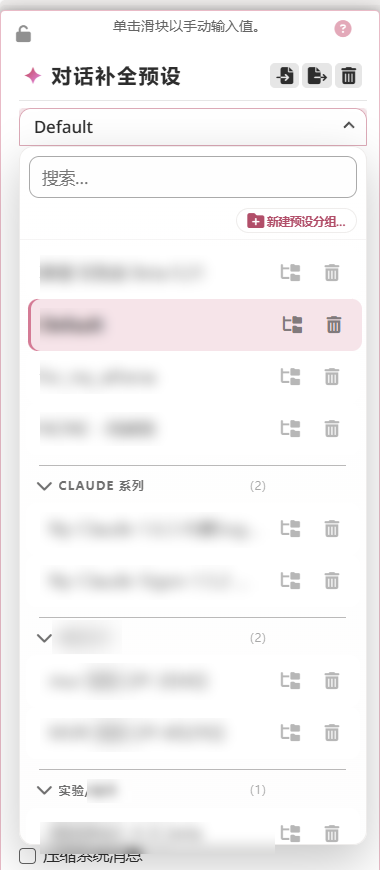
In the screenshot, ungrouped presets stay at the top of the list, followed by several group headers. Each header carries a member count and a collapse chevron; expanding shows indented members underneath, and the trailing icons let you reassign or delete a preset.
Data Model
Each group contains the following fields:
{
    id: string,         // Group ID (currently generated as pg-<timestamp>-<random>)
    name: string,       // Group name
    presets: string[]    // List of member preset names
}
Group data is stored per API type in power_user.preset_groups[apiId], read via getPresetGroups(), and mutated via methods such as createPresetGroup(), renamePresetGroup(), deletePresetGroup(), addPresetToGroup(), and removePresetFromGroup(), then persisted through settings saves.
Independent Per API Type
Preset groups are maintained independently per API type (e.g., Chat Completion, Text Completion, etc.). Groups for different API types do not affect each other — switching API types loads the corresponding group configuration.
Group Display
Collapsible Group Headers
In the preset dropdown selector, each group is displayed as a collapsible header. Clicking the header expands or collapses all presets under that group, making it easy to quickly locate presets among a large collection.
Indented Member Display
Preset members within a group are displayed with indentation below the header, creating a clear visual hierarchy.
Ungrouped Presets Stay at Top Level
Presets not assigned to any group remain at the top level of the dropdown list, unaffected by the group structure.
Group Management
Context Menu
Preset group management operations are performed through the context menu:
- Create group: Create a new named group
- Rename group: Modify the name of an existing group
- Delete group: Remove the group; member presets return to ungrouped state
- Move into/out of group: Add a preset to a group or remove it from a group
Preset Lifecycle Sync
The group system automatically responds to preset lifecycle events:
- Preset renamed: Member names in groups are automatically updated
- Preset deleted: Automatically removed from the associated group
Select2 Adapter
Luker implements a custom Select2 adapter for rendering group structures and action buttons in the dropdown selector:
- Collects all real option elements (skipping group headers)
- Preserves custom attributes (e.g.,
data-luker-char-bound) - After clearing the select, adds ungrouped presets first
- Adds headers and members in group order
Related Features
- Prompt Groups — Grouping system in the prompt manager
- Preset Completion Assistant — AI-assisted understanding and adjustment of preset parameters