Preset System
Presets control how the AI generates responses — from which prompts to use and how to organize the context, to generation parameters like temperature and sampling strategies. Understanding the preset system is key to fine-tuning AI response quality.
What is a Preset
A preset is a saved set of configurations containing two major categories of information:
- Prompt configuration: The content and arrangement order of system prompts, determining the context structure sent to the AI
- Sampling parameters: Generation parameters like Temperature, Top-P, and Top-K that affect the randomness and creativity of AI responses
You can create multiple presets and quickly switch between them for different use cases. For example, one preset for serious narrative writing and another for casual everyday conversation.
Luker's Preset Decoupling
This is one of Luker's most important improvements over SillyTavern.
The Problem
In SillyTavern, "API connection settings" and "chat completion presets" are coupled together. Switching presets also changes the API address, key, model selection, and other connection parameters. This means if you want to switch prompt sets while keeping the same API, or switch APIs while keeping the same prompts, it's quite inconvenient.
Luker's Approach
Luker splits presets into two independent concepts:
- Connection Profile: Manages API address, key, model selection, proxy, and other connection parameters
- Chat Completion Preset: Manages prompt content, arrangement order, and sampling parameters
The two can be freely combined. You can use the same API connection with different presets, or use the same preset with different APIs. Switching one doesn't affect the other.
For detailed information, see Preset Decoupling.
TIP
If you're migrating from SillyTavern to Luker, your existing presets will be automatically adapted. Connection-related fields are separated into connection profiles, and presets retain only generation-related settings.
Prompt Manager
The Prompt Manager is the core component of presets, used to manage all prompt entries sent to the AI and their arrangement order.
Prompt Entries
Each preset contains multiple prompt entries. Common ones include:
- Main / System Prompt: The primary system prompt defining the AI's basic behavior
- Character Description: Description information from the character card
- Character Personality: The character's personality summary
- Scenario: Scene description
- Example Dialogue: Example conversations
- World Info: World Info injection position
- Chat History: Chat history
- Author's Note: Author's note, typically used for real-time AI behavior adjustments
- Jailbreak / NSFW: Prompts for removing restrictions
You can enable or disable each entry and edit their content.
Prompt Order
The arrangement order of prompt entries directly affects AI behavior. AI models typically pay more attention to content that appears later, so key instructions (such as character behavior guidelines) are usually placed close to the chat history.
You can drag and drop to rearrange entry order:
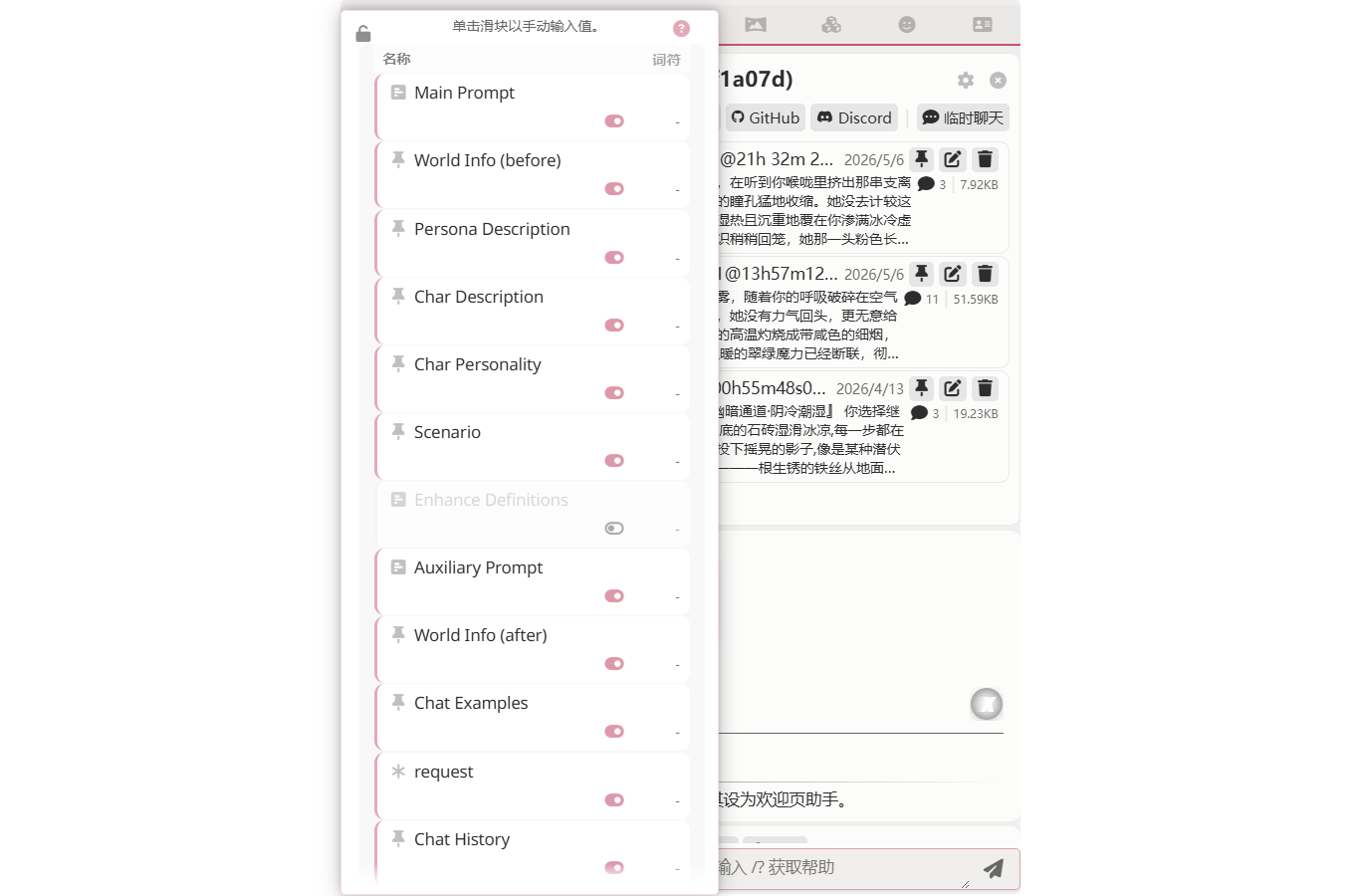
Each entry shows a token count and an enable/disable toggle on the right. Entries marked with a star * are added by the current preset; entries like Main Prompt / Char Description / World Info (before) are SillyTavern's built-in standard entries.
Prompt Groups
Luker adds a prompt grouping feature. You can organize multiple related prompt entries into a named group, displayed as a collapsible section in the interface. This effectively reduces visual clutter when you have many prompt entries.
Sampling Parameters
Sampling parameters control the AI's text generation behavior:
| Parameter | Description |
|---|---|
| Temperature | Controls randomness. Higher values produce more creative but potentially off-topic responses; lower values produce more stable but potentially repetitive responses |
| Top-P | Nucleus sampling. Limits the AI to choosing from candidate tokens whose cumulative probability reaches P |
| Top-K | Limits the AI to choosing from the K highest-probability candidate tokens |
| Max Tokens | Maximum number of tokens per response |
| Frequency Penalty | Reduces the probability of repeating already-used words |
| Presence Penalty | Encourages the AI to use new words and topics |
INFO
Different API providers support different parameters. Luker automatically displays available parameters based on the currently connected API. Additionally, Claude does not support custom temperature parameters in Extended Thinking mode.
Preset Import, Export, and Sharing
Exporting Presets
You can export the current preset as a JSON file for backup or sharing with other users. Exported presets don't include API connection information (thanks to preset decoupling), so sharing won't expose your API keys.
Importing Presets
Import presets from JSON files. Imported presets appear in the preset list for selection.
Preset Groups
Luker supports organizing presets into named groups, displayed as groups in the dropdown selector. When you've accumulated many presets, grouping helps you quickly find the one you need.
Card-Bound Presets
Character cards can bind one or more dedicated chat completion presets. When you open a chat with a character that carries embedded presets, Luker adds a Card-bound group to the top of the preset selector listing every preset the card ships with, and auto-selects the card's default.
Card-bound presets are runtime-only — they don't appear in your global preset list, don't overwrite same-named local presets, and are removed from the selector when you leave the character. When exporting a character card, the embedded preset set travels with it.
This is especially useful for card creators — you can ship a character with the sampling and prompt shape you tuned it against, and users get that behavior immediately on import without any additional setup.
See Character Card Basics and Card-Bound Presets and Personas for details.
Preset-Associated World Info
Luker supports associating World Info (Lorebook) with presets. When switching presets, the associated World Info is automatically activated — no manual switching needed. This is particularly useful when you have different preset + World Info combinations for different scenarios — for example, a roleplay preset associated with character lore, or a writing preset associated with writing guidelines.
See Preset-Associated World Info for details.
Preset Completion Assistant
Luker includes a built-in AI-powered Preset Completion Assistant. It not only helps you understand what each preset parameter means and provides tuning suggestions, but can also directly modify prompt entries in your preset — for example, optimizing system prompt wording or adjusting prompt structure and content. You can describe your needs through conversation, and it will generate modification suggestions displayed as diffs for you to approve item by item.
See Preset Completion Assistant for details.
Next Steps
- Learn how API Connections work with presets
- Learn how Character Cards bind presets
- Dive deeper into Preset Decoupling design details