Skills
When the orchestrator dispatches an agent, that agent only sees the skills you've made visible to it — not the whole skill library. This page is about making a skill visible to an agent, from the orchestrator panel.
For what a skill actually is and how to write one, see the Skills overview.
Two ways to attach a skill
Have the Studio attach it for you (recommended). When you ask the AI Iteration Studio to author or edit a skill, tell it where you want the skill applied — "so every agent in director mode sees it", "only for voice_critic", etc. — and it'll wire the skill into the right place during the same approval round. You don't have to think about layering. See the recipe and the Studio docs.
Attach it yourself. Open the director editor in the orchestrator panel and scroll down to the skill list section. Each agent has its own list, plus a shared list at the top that every agent inherits from. Pick a skill from the dropdown, click Add, save.
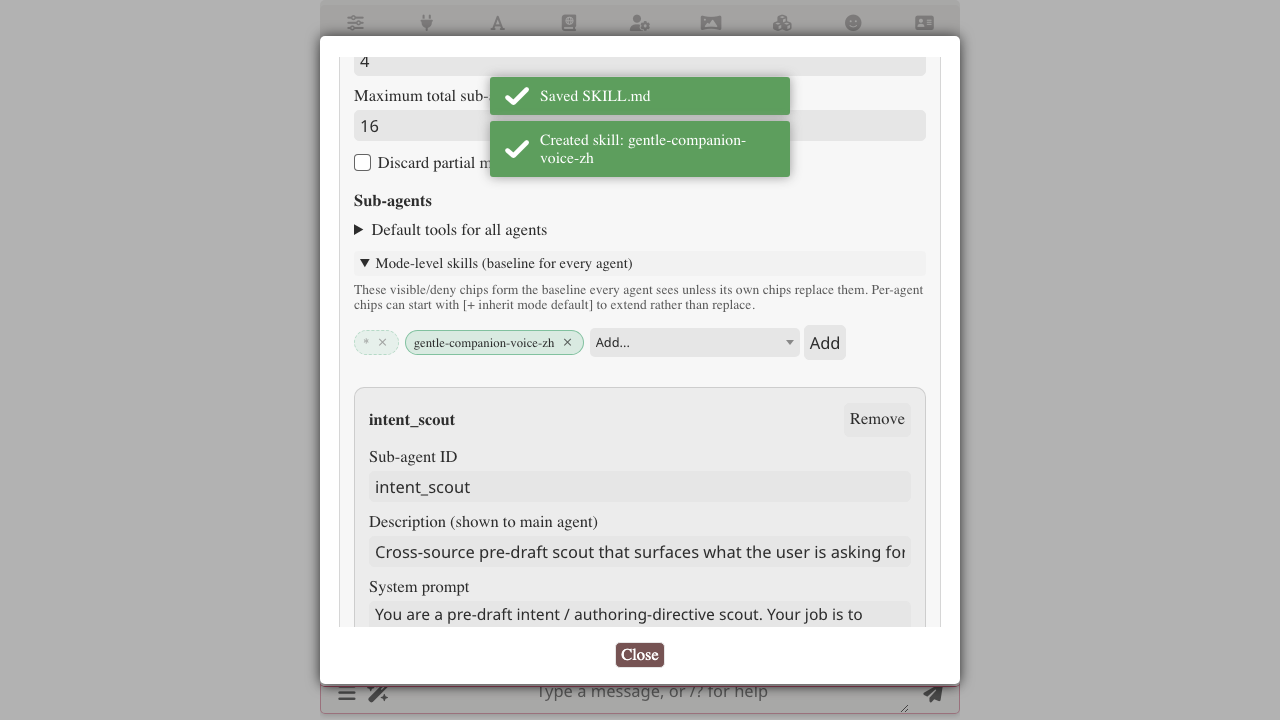
If you're unsure which list to use, the Studio is the easier path — just describe what you want and let it decide.
What the agent sees at dispatch time
The runtime prepends a short catalog to the agent's system prompt — names + descriptions, no bodies:
<available_skills>
- director-character-voice-zh: Character voice consistency rules — living-being principle, archetype handling, voice-register matching.
- director-no-meta-zh: 禁止破坏沉浸——叙述与对话都在故事世界内,作者侧装置不在场。
- director-anti-cliche-zh: Anti-cliché checklist — banned phrases, narrative-template avoidance, freshness rules.
- voice-critic-method-zh: How voice_critic audits a draft — pass criteria, common failure modes, hand-off back to the main agent.

(Use skill_read to consult specific content; skill_search to grep within a skill.)
</available_skills>
The agent decides what's relevant. If one description sounds load-bearing for the current task, the agent calls skill_read({name: "..."}) and the SKILL.md body comes back as a tool result.
The catalog only lists names. When skill_read is actually called, the runtime walks character → preset → global to find the body — character scope wins over preset, preset over global. So a character-scoped skill of the same name silently overrides a global one while that card is loaded.
Related
- Skills overview — what a SKILL.md is, how scopes work
- Skill management — install / import / delete / move scope
- Authoring skills — writing rules for skill bodies
- Orchestrator integration in depth — the full layered policy, inheritance, wildcards, deny lists
- AI Iteration Studio — let the LLM author skills for you
- Recipe: shaping RP output with skills — end-to-end walkthrough