Search Tools
Search Tools provides AI characters with web search capabilities, allowing characters to retrieve real-time information during conversations and inject search results into the context. The search plugin supports multiple search engine backends and provides two working modes to accommodate different use cases.
Two Working Modes

Tool Mode
Search functionality is registered as a callable tool for the creative LLM in the Function Call Runtime. When the AI determines it needs to search for information, it proactively initiates a tool call.
- Enabled via the
enabledconfiguration option - Registers
luker_web_searchandluker_web_visitas function tools - AI autonomously decides when to search and what to search for
- Search results are injected into the conversation context as tool call return values
Pre-request Agent Mode
Before the creative LLM generates a response, an independent search Agent runs automatically. The Agent analyzes the current conversation content, determines whether a search is needed, and writes search results into World Info entries.
- Enabled via the
preRequestEnabledconfiguration option - The Agent uses independent LLM presets (
agentPresetName) and API presets (agentApiPresetName), which can use different models from the creative LLM - Agent maximum execution rounds are controlled by
agentMaxRounds - Search results are automatically created as World Info entries that the creative LLM can directly read during generation
- Supports stopping Agent execution via the Stop button on toast notifications
Choosing Between Modes
Tool Mode is suitable for scenarios where the model needs to autonomously decide when to search during conversation — for example, when a user asks "What's in the news lately?" the model will automatically call the search tool to get information. Search behavior is autonomously triggered by the model based on conversation content.
Pre-request Agent Mode automatically executes searches before each AI generation, with the search process completely separated from the main conversation. Suitable for scenarios where you want every response to be backed by the latest information.
Settings Panel
All search plugin configuration lives under the "Search Tools" subsection of the extensions panel:
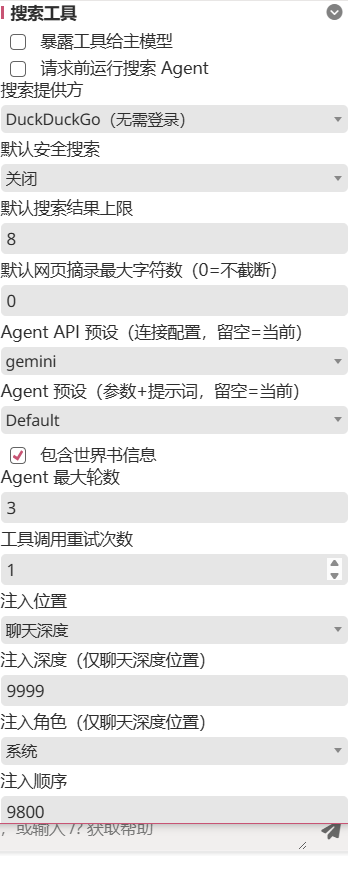
The two top toggles map to the two modes above ("Expose tools to main model" = Tool Mode, "Run search agent before requests" = Pre-request Agent Mode); they can be enabled independently or together. Below them are engine selection, agent-only presets, and World Info entry injection parameters.
Supported Search Engines
| Search Engine | Description | Configuration Requirements |
|---|---|---|
| DuckDuckGo | Default search engine, no API key required | Works out of the box |
| SearXNG | Self-hosted meta search engine, privacy-friendly | Requires self-hosted instance URL |
| Brave Search | Search API provided by Brave | Requires API key |
The search engine is selected via the provider configuration option, with each engine's independent configuration stored in providerSettings. You can also configure the safe search level via safeSearch.
World Info Entry Management
In Pre-request Agent Mode, search results are automatically created as World Info entries. The behavior of these entries can be controlled through the following configuration options:
| Setting | Description |
|---|---|
lorebookDepth | Injection depth of entries in the prompt |
lorebookRole | Role marker for entries (e.g., system, assistant) |
lorebookEntryOrder | Sort weight of entries |
lorebookPosition | Injection position of entries |
Search result entries can be set to constant (always active) or activated through keyword matching, depending on the Agent's judgment and configuration.
Global API
The search plugin provides a global API for integration by other plugins. For example, the Character Card Editor Assistant's popup and CardApp Studio both integrate the search capability, enabling web searches for reference materials during card / CardApp editing.
Properties
| Property | Type | Description |
|---|---|---|
toolNames | Object | Tool name constants object, containing SEARCH and VISIT |
Methods
| Method | Return Value | Description |
|---|---|---|
getToolDefs() | Array | Returns the search tool definition array, including tool names, parameter schemas, etc. |
isToolName(name) | boolean | Determines whether a given name is a tool name registered by the search plugin |
invoke(call, options) | Promise | Invokes a search tool; call contains the tool name and parameters |
search(args) | Promise | Directly executes a search and returns results |
visit(args) | Promise | Directly visits a specified web page and returns page content |
getSettings() | Object | Returns a snapshot of current search plugin settings |
Usage Example
const api = Luker.searchTools;
if (api) {
  // Check if it's a search tool
  api.isToolName('luker_web_search'); // true

  // Get tool definitions
  const defs = api.getToolDefs();

  // Directly call search
  const results = await api.search({ query: '...', maxResults: 5 });

  // Visit a web page
  const page = await api.visit({ url: 'https://...', maxChars: 10000 });
}
Result Reuse
The search plugin implements a fine-grained result reuse mechanism to avoid redundant searches in unnecessary scenarios.
The system automatically determines whether the previous search Agent's results can be reused. Reuse requires all of the following conditions to be met:
- The current chat key matches the previous snapshot's chat key
- The user anchor (characteristics of the last user message) matches the previous snapshot
- The current generation type belongs to a reusable type (e.g., regeneration, continue generation scenarios)
When results are reused, the UI displays a (reused) marker, indicating that cached search results were used for this generation.
Impact of Message Operations
The search plugin monitors message deletion and editing events, automatically maintaining internal state consistency:
- Message deletion — Updates search state based on the range of deleted messages, ensuring no references to search results from deleted messages
- Message editing — Updates search state based on the edited message position, potentially invalidating cached search results
Configuration Reference
| Setting | Description |
|---|---|
| Enable Search Tools | Enable Tool Mode, allowing the model to autonomously call search during conversation |
| Enable Pre-request Agent | Enable Pre-request Agent Mode, automatically searching before each generation |
| Search Engine | Select search engine (DuckDuckGo / SearXNG / Brave Search) |
| Search Result Count | Number of results returned per search |
| Page Extract Characters | Maximum text length extracted when visiting web pages |
| Safe Search | Safety filtering level for search results |
| Agent API Preset | API connection preset for the pre-request Agent (empty uses main connection) |
| Agent Preset | Preset for the pre-request Agent (empty uses main preset) |
| Agent Max Rounds | Maximum search rounds for the pre-request Agent |
Related Pages
- Character Card Editor Assistant — Editor assistant overview (shared capabilities and entry points)
- Popup Mode — Web search inside the popup
- CardApp Studio — Web search inside Studio
- CardApp — Character card application concept